Do You Actually Need a CRM? Squarespace vs. HoneyBook for Small Service Businesses
Everyone says you need HoneyBook. But do you, really?
If you've spent any time in creative business spaces online, you've probably seen it: the confident recommendation that every service-based business needs a CRM. HoneyBook and Dubsado get mentioned constantly, and they're truly great tools. But "great tool" and "right tool for you" aren't always the same thing.
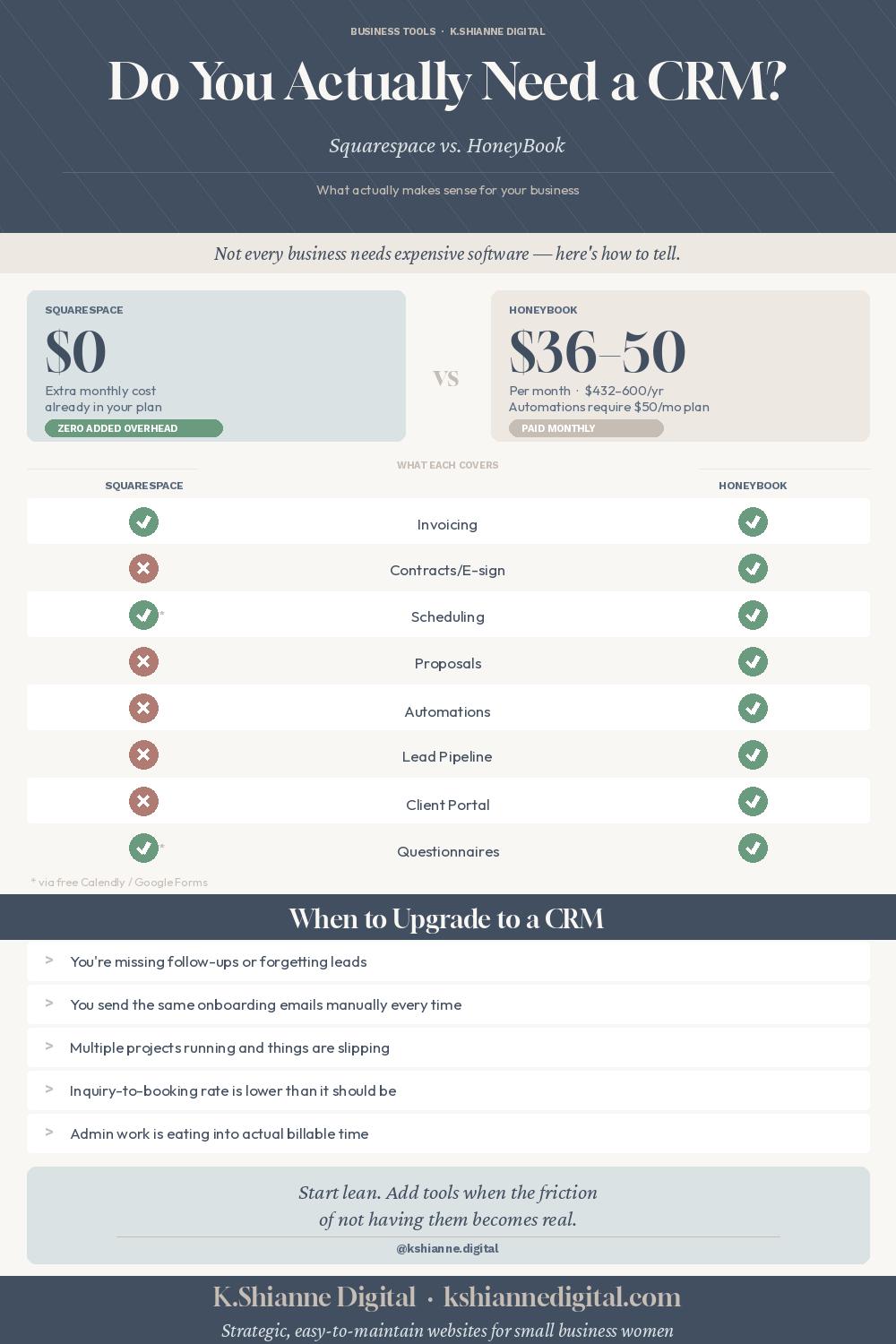
Here's the truth: Squarespace already includes invoicing, scheduling, and basic contract capability right out of the box. If your business runs a smaller number of higher-touch projects, you may be paying $36–$50/month for software that duplicates what you already have.
Let's look at both options: how they actually work in practice, what each handles well, and when it actually makes sense to upgrade.

“The best tool isn’t the most powerful one. It’s the one that fits your actual business without creating more overhead to manage.”
First: What Does Squarespace Actually Offer?
Most Squarespace users don't realize how much is already included. Depending on your plan, you have access to:
Invoicing — Create and send professional invoices directly from Squarespace. Clients pay online via credit card. You get paid. Simple.
Scheduling — Squarespace Scheduling (powered by Acuity) lets clients book appointments, intake forms can be attached, and reminders go out automatically. A free Calendly account works here too if you prefer to keep things separate.
Basic Contracts — You can attach contract language to your scheduling flow or invoicing process, though it doesn't include e-signature natively. A free tool like DocuSign's basic tier or HelloSign can fill this gap without adding cost.
It's not as automated or robust as a dedicated CRM — but for many businesses, it doesn't need to be.
Two Real-World Business Inquiry to Invoicing Flows - Side by Side
Let's walk through how each option actually works for a business, such as a photographer or designer, booking a new client.
Option A
The Squarespace + Calendly Flow
1 - Inquiry comes in via your contact form.
You receive an email notification. You reply personally — which, for a limited-client business, is actually a feature. The personal touch matters.
2 - Send a discovery call link via Calendly (free plan).
Client picks a time, books themselves. You get a calendar invite. Takes you about 30 seconds of effort.
3 - After the call, send a proposal/contract.
Write up your scope in an email or a simple PDF. Attach your contract via DocuSign basic (free for limited sends) or a tool like PandaDoc's free tier. Client signs.
4 - Send an invoice in Squarespace.
Takes a few minutes. Client pays online. Funds deposit to your account. Done.
5 - Project begins.
Ongoing communication via email. For a 3-5 week design project, this is completely manageable.
Questionnaire and welcome packet can be sent via Google Drive / Google Forms manually via email.
6 - Send final invoice for remaining balance.
Same Squarespace invoice process. One more payment, and you're done. You track the payment schedule and send reminders if necessary.
Option B
The HoneyBook Flow
1 - Inquiry comes in via your HoneyBook contact form embedded on your site.
HoneyBook captures the lead, logs it automatically, and can trigger an automated response sequence.
2 - Automated inquiry response sends immediately.
A pre-written email goes out within seconds — even while you're at your day job or handling the kids. It can include your pricing guide, a scheduling link, or a welcome video.
3 - Client books a discovery call via HoneyBook's built-in scheduler.
No separate Calendly needed. Reminders go out automatically.
4 - Send a proposal, contract, and invoice — all in one link.
This is HoneyBook's superpower. One smart file: client reads the proposal, signs the contract, and pays the deposit. All in one click.
5 - Automated onboarding sequence begins.
A questionnaire goes out, a welcome email is triggered, your project is created in your pipeline view. Client communication is centralized.
6 - Automated payment reminders and final invoice.
HoneyBook tracks payment schedules and sends reminders without you lifting a finger.
Both flows work. The Squarespace flow requires more manual touches. The HoneyBook flow requires more upfront setup. For a business booking 2–4 clients a month, the manual touches are likely no big deal. For a business fielding 10+ inquiries a week, HoneyBook starts to pay for itself in time saved.
Feature-by-Feature: What Squarespace & Free Tools and Honeybook Does Well

Squacespace & Calendly vs Honeybook - Cost Comparison
This is often where the conversation shifts. HoneyBook isn't super expensive, but it's also not free, and for a newer business watching every dollar, it matters.
SQUARESPACE + FREE TOOLS
$0
Additional monthly cost beyond your Squarespace plan. Calendly free tier + DocuSign basic covers the gaps.
HONEYBOOK
$36-50
Per month. Starter ($36) covers invoicing and contracts but excludes automations and scheduling. Essentials ($50) includes both.
Over a year, that's $432–$600, which isn’t crazy but it adds up, especially early on. And worth noting: the Starter plan at $36/month doesn't include automations or scheduling, so to get the full CRM experience most people are actually talking about, you're looking at $50/month. If HoneyBook saves you 5+ hours a month in admin time, it's obviously worth it. If it saves you 20 minutes, probably not.
So… Who Should Use What?
Squarespace's built-in tools are a great fit if you:
Book a smaller number of larger, higher-touch projects (think 1–5 clients at a time). You're a web designer working with clients over a 3-week period, a photographer booking 8–10 sessions a month, or a consultant with just a handful of ongoing relationships. The manual steps are genuinely manageable, and the personal touch of a hand-crafted email is often an asset, not a liability. You like keeping your tech stack simple and your overhead low.
HoneyBook or Dubsado makes sense when:
When any of those start to feel familiar, that's the signal. Not "everyone says I need one" — but actual friction in your real business.
The Bottom Line
HoneyBook is a genuinely excellent tool — and if your business has the volume or the admin load to justify it, it's worth every dollar. But not every business does, and there's no award for having the most software subscriptions.
If you're just starting out, or you're running a focused service business with a limited number of clients at a time, Squarespace's built-in invoicing and a free Calendly account will take you further than you might think. The time you'd spend setting up HoneyBook automations might be better spent booking your next client.
Start lean. Add tools when the friction of not having them becomes real. That's a much cleaner reason to invest than because someone in a Facebook group said you should.
“The goal isn’t to build the most automated business. It’s to build one that runs well enough that you still actually want to run it.”
Have questions about what tools actually make sense for your specific business? That's exactly the kind of thing we can sort through together.